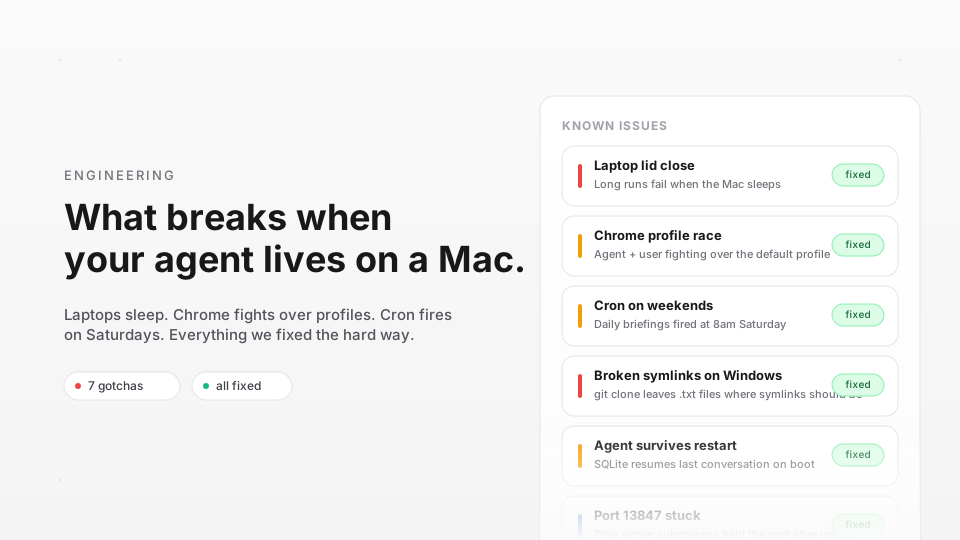
Cloud AI agents run on servers that never sleep, never lose wifi, and never share a browser with a human. Desktop AI agents do not have that luxury. After shipping Foxl on macOS and Windows, we have a growing list of things that break when your AI agent lives on a real machine. Here are the gotchas we hit and how we dealt with them.
Your laptop sleeps. Your agent does not know.
Foxl has a scheduler that runs tasks on cron schedules - "every weekday at 9am, brief me." The problem: when a MacBook sleeps at 8:55pm and wakes at 9:30am, the system clock jumps forward. The scheduler sees "it is past 9am, fire!" without checking whether today is Saturday.
This caused weekend briefings for users who left their laptops open. The fix was not just parsing weekday fields correctly (which we also had wrong), but also adding a wake-up reconciliation step. When the app detects a time jump, it recalculates the next valid run time instead of firing immediately. Lesson: in a desktop app, "what time is it" is not a simple question.
Browsers fight over profiles
Foxl controls your real Chrome browser. Early on, we used your default Chrome profile. This seemed convenient - the agent could access your Gmail, GitHub, Slack, all your logged-in sessions. In practice, it was a mess.
If you had Chrome open, Foxl sometimes could not launch a session because Chrome locks its profile directory. If the agent opened tabs during a task, they mixed into your personal browser. If Chrome crashed during agent browsing, your own tabs went down too.
The solution was a dedicated browser profile. Foxl creates its own Chrome user data directory. You log into services once through the agent, and those sessions persist across restarts. Your personal Chrome is completely isolated. The tradeoff is one extra login step, but nobody has complained - it is far better than the alternative.
Parallel agents race each other
Foxl can spawn multiple subagents to research topics in parallel. When 3 agents finish around the same time and all try to deliver results to the parent conversation, you get a race condition. In early versions, this sometimes caused duplicate responses - the parent agent would synthesize results twice, or even spawn additional agents it did not intend to.
The core issue was in-memory queues. Two different code paths handled "subagent completed" events, and both assumed they were the only one running. We replaced this with a SQLite-backed queue and a lock table. Only one result-synthesis pass runs at a time, and it drains all pending results in one batch. Simple and reliable.
Windows line endings break everything
Foxl ships with 73 skills defined as Markdown files. Each skill starts with YAML frontmatter between --- delimiters. On macOS, the regex /^---\n/ matches perfectly. On Windows, git clone produces \r\n line endings, and the regex silently fails. Every skill parsed to empty.
The fix is a single line of normalization before parsing. But the lesson is broader: if you ship text files that users (or git) might modify, never assume \n. We now normalize line endings at every text-file ingestion point.
Node.js might not exist
Foxl's desktop app runs an embedded Express server. On macOS, most developer machines have Node.js. On Windows, many users do not. Our first Windows build assumed Node.js was in PATH. It was not. The app opened and immediately crashed.
We now bundle Node.js v22 into the app package. The binary adds 75-110MB to the installer, but the app works out of the box. At runtime, Foxl checks for the bundled binary first, falls back to the system Node.js if available, and shows a clear error if neither exists. For non-developer users, "it just works" is worth the download size.
Real-time remote access on unreliable connections
Foxl connects your desktop to app.foxl.ai through an encrypted relay so you can control your agent from your phone. The connection is a WebSocket that must survive wifi drops, laptop sleep, and coffee-shop networks.
Our first approach used aggressive 30-second heartbeats. This kept the connection alive but woke the relay server constantly, costing $8/month per user pair. We switched to HTTP-based liveness checks that bypass the relay's compute layer entirely, with protocol-level WebSocket pings for edge keepalive. The connection recovers from a 10-minute laptop sleep in under 5 seconds, and relay cost dropped to $0.41/month.
The desktop is different
Every problem on this list has a simple root cause: desktop machines are controlled by humans, not ops teams. They sleep, they switch wifi, they have other apps fighting for the same resources. Building a desktop AI agent means accepting this reality and designing around it, not assuming server-like conditions.
We are still learning. If you are building something similar, join our Discord or dig through the docs.