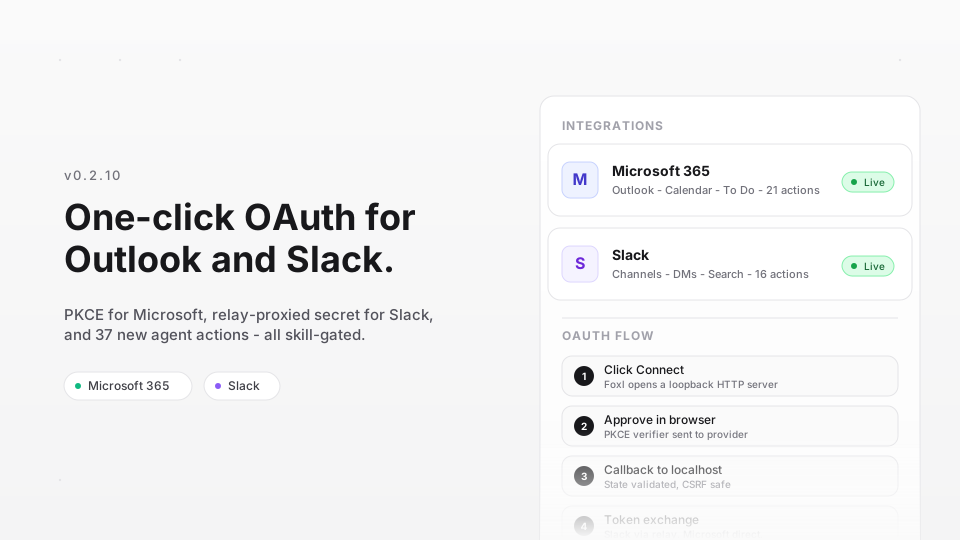
Foxl v0.2.10 ships a full OAuth integration system for Microsoft 365 and Slack. One click to connect, zero API keys to paste. The agent gets 37 new actions across email, calendar, tasks, and messaging - all running as you, not as a bot.
Why OAuth, not API keys
Most AI agent integrations ask you to create a Slack app, generate a bot token, paste it into a config file, and hope you set the right scopes. That works for developers. It does not work for the person who just wants their agent to summarize their unread Slack threads every morning.
OAuth flips this. You click Connect, approve permissions in your browser, and the agent has access. No tokens to manage, no scopes to research. If you revoke access later, the agent loses the tools automatically.
The architecture
Two providers, two different OAuth strategies - chosen to match how each provider handles secrets.
Microsoft 365: PKCE, no secrets
Microsoft Graph supports public-client OAuth with PKCE (Proof Key for Code Exchange). The desktop app generates a random code verifier, hashes it into a challenge, and sends the challenge in the authorization URL. When the browser redirects back with an auth code, the app exchanges it directly with Microsoft using the original verifier. No client secret ever exists.
This is the gold standard for desktop apps. The token exchange happens directly between the Foxl server (running on localhost) and login.microsoftonline.com. Nothing passes through any intermediary.
Slack: relay-proxied secret
Slack's OAuth V2 requires a client_secret in the token exchange. Shipping that secret in a desktop binary is a security mistake - anyone can extract it. Instead, the desktop app sends the authorization code to relay.foxl.ai/integrations/slack/exchange, which appends the secret and forwards the request to Slack's API. The secret lives only in Cloudflare Worker environment variables, never in the binary.
The relay endpoint is stateless. It receives the code, adds the secret, forwards to Slack, and returns Slack's response verbatim. It does not store tokens. The desktop app receives the user token and stores it locally.
Loopback callback server
Both flows use a shared loopback HTTP server to receive the OAuth callback. When you click Connect, Foxl starts a short-lived HTTP server on localhost:3848 (Microsoft) or localhost:3849 (Slack). The browser redirects to this URL with ?code=...&state=... after you approve.
The server validates the state parameter (CSRF protection), extracts the code, shows a success page in the browser, and shuts itself down. The entire lifecycle is under 5 minutes - if no callback arrives, the server times out and cleans up.
A common edge case: clicking Connect twice. The second click cancels the first flow (closes the old loopback server, waits for port release) and starts fresh. The previous pending promise is rejected, and the new flow gets a clean port.
Skill-gated tool registration
Agent tools consume context window tokens. Loading 37 Slack and Outlook action schemas into every conversation - even when the user has not connected either service - wastes roughly 3,000 tokens per request. That adds up.
Foxl solves this with skill-gated registration. Each integration tool has a corresponding skill file with requires: [integration:slack] or requires: [integration:microsoft]. At server startup, and after every connect/disconnect event, the skill eligibility check runs:
- Load all skills from disk
- For each skill, check if its
requires array is satisfied (integration connected? binary available? env vars set?) - Register tools for eligible skills, remove tools for ineligible ones
This means the agent's tool list is always exactly what is available. Connect Slack, the slack tool appears. Disconnect it, the tool disappears. No restart needed.
What the tools can do
Outlook (21 actions)
The outlook tool covers three areas of Microsoft 365. Email: inbox, read, send, reply, forward, search, folders, drafts, attachments, contacts, move, categories, and update (flags, read status, importance). Calendar: view events, create/update/delete meetings, check availability (free/busy), book rooms, search, and list shared calendars. To-Do: manage lists, tasks (create, complete, update), and checklist items.
All operations go through Microsoft Graph with automatic token refresh. When the access token expires (typically after 1 hour), the tool transparently refreshes it using the stored refresh token. If the refresh token itself is invalid, the user sees a "reconnect required" message.
Slack (16 actions)
The slack tool operates as a user token (xoxp-), not a bot. This means it can access private channels the user is in, search with the user's permissions, and send messages that appear from the user. Actions include: search messages, list channels, read conversation history and threads, send messages, open DMs, add/remove reactions, upload files, look up users, and download attachments.
One design choice: the tool uses a single dispatcher with an action parameter rather than 16 separate tools. This keeps the tool schema compact (one tool definition vs. sixteen) while still exposing full functionality. The agent sees the action list in the tool description and picks the right one.
Workspace selection
Slack OAuth normally connects to whatever workspace your browser session is logged into. If you are in multiple workspaces, this can be the wrong one. Foxl adds an optional workspace name field - enter mycompany and the OAuth URL points to mycompany.slack.com/oauth/v2/authorize, which forces the consent page into that workspace's login context.
Security model
Tokens are stored in the local SQLite database (agent_memory table) on your machine. They never leave the desktop - not even through the relay. The relay only sees the one-time authorization code during Slack's initial exchange. Microsoft tokens never touch the relay at all.
The Electron app restricts openExternal to http/https URLs only, preventing the OAuth flow from being abused to open arbitrary schemes. The deep-link fallback (foxl://integrations/callback) handles environments where the loopback port is blocked by a firewall.
What is next
Google Workspace (Gmail, Calendar, Drive) is the obvious next provider. The loopback + PKCE pattern already handles it - Google supports public-client OAuth the same way Microsoft does. Beyond that, we are looking at GitHub and Jira for development workflow integration.
The skill-gating pattern scales to any number of providers. Each new integration is a skill file, an auth module, and a tool dispatcher. The framework handles the rest.