Foxl v0.2.11 introduces a new way for your agent to reach out to you, without the noise. The Feed page replaces the old Activities tab with three focused views — For You, Activities, and Logs — and a new background agent called the Feed Generator that periodically surfaces things worth knowing about.
Why not just more notifications
Most "proactive" AI agents turn into notification spam within a week. Every check becomes a popup. Every suggestion demands attention. You disable notifications. The feature dies.
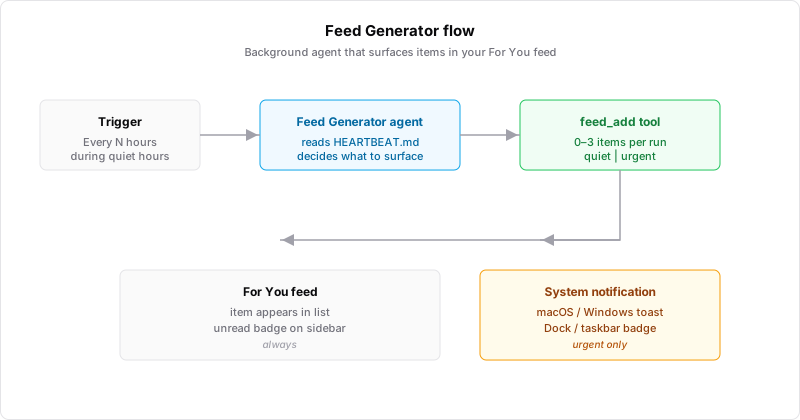
The Feed Generator takes a different approach. Each run produces zero or a few items. Most land quietly in the For You tab — no toast, no sound, no badge flash. Only items the agent marks urgent — a deadline within 24 hours, a stuck task, something you explicitly asked to be alerted about — trigger a system notification. This way it can run hourly, or even every 15 minutes, without you noticing unless something actually matters.
How it works
The Feed Generator is a regular Foxl agent configured by a single file in your workspace: HEARTBEAT.md. That file is the prompt. It tells the agent what kinds of things to surface, what priority levels mean, and — importantly — what NOT to surface.
The default prompt makes three things clear to the agent:
- Most runs should produce nothing. An empty run is fine.
- Don't repeat items you already surfaced recently. Check memory first.
- Don't send
urgent for things that can wait. Spammed users disable you.
The agent has access to a single dedicated tool, feed_add, that takes a title, body, and priority. That tool is not exposed to chat or subagents — only the Feed Generator executor can call it. This keeps normal agent interactions clean while giving this one background agent the ability to write to the feed.
The For You tab
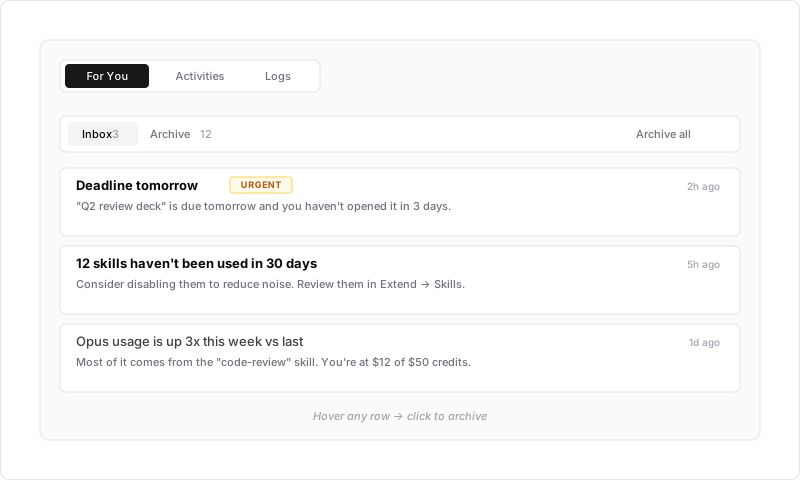
Items show up in a clean list. Urgent items get an amber "URGENT" badge but no loud red backgrounds or icons. Hover any row and click to archive. Toggle between Inbox and Archive at the top. No per-item icon targets to aim for.
The unread count appears on the sidebar's Feed entry and on the macOS Dock icon (or Windows taskbar overlay, new in this release). Both update the moment an item arrives.
Settings you actually use
The old Heartbeat settings card was a wall of controls: Status, Last Run, Next Due, Interval dropdown, two Active Hours dropdowns, a Custom Prompt textarea, and a save button. We compacted it.
The new Feed Generator card has a one-line status strip (● Running · Last run: 10:47 · Next check: 11:47), Frequency and Quiet Hours side-by-side, and the HEARTBEAT.md instructions collapsed by default. Save is disabled unless something changed, and a Revert action throws away unsaved edits.
Default interval is now 1 hour — not 5 minutes. Because most users don't need a check-in faster than that, and because the quiet/urgent split makes hourly feel ambient rather than intrusive.
Other things in this release
- Sidebar restructure. Chat, Overview, and Workspace live at the top with no group label. Agents, Tools, Skills, and Schedules moved into a new "Extend" group. Relay and Integrations are under "Connect". The old "Activities" entry is now "Feed".
- Schedules page Type filter. Recent Runs now has a Status / Type / Schedule / Time / Sort filter bar. By default, Heartbeat-type executions are hidden from the runs list (they are Feed Generator internals), but you can pick "All types" or "Heartbeat only" to drill in.
- Windows taskbar badge. Unread count now shows as a red overlay on the Windows taskbar icon, matching the macOS Dock behavior.
- Skills cleanup. Enable-all / Disable-all moved from a toolbar button to a subtle "3/12 on" counter pill. Right-click any skill card for quick enable, reveal in Finder, or delete.
- Notification settings. Behavior (Only in background, Sound) merged into the master toggle. New Feed section with separate toggles for urgent and quiet items. Test scenarios collapsed into a single dropdown with a live preview card.
- Config housekeeping. Live Logs removed from the Config page — use Feed → Logs instead. Same SSE stream, better placement.
Upgrade
v0.2.11 rolls out via auto-update today. Existing HEARTBEAT.md files are preserved as-is — if yours still has the old template, delete it and the app will regenerate with the new Feed Generator default. Disabled by default; turn it on from Config → Feed Generator when you want to give it a try.