Foxl v0.2.13 ships a big cozy-office redesign, a new 2.5D sprite layer that lets tall furniture stand up in the world, real-time pet-position persistence, and notifications that can finally drive you back to the exact agent that finished. Plus a pile of smaller fixes that unblock Windows users, Feed Generator users, and anyone who ever hit "restart from tray."
Pixel Office, redesigned end-to-end
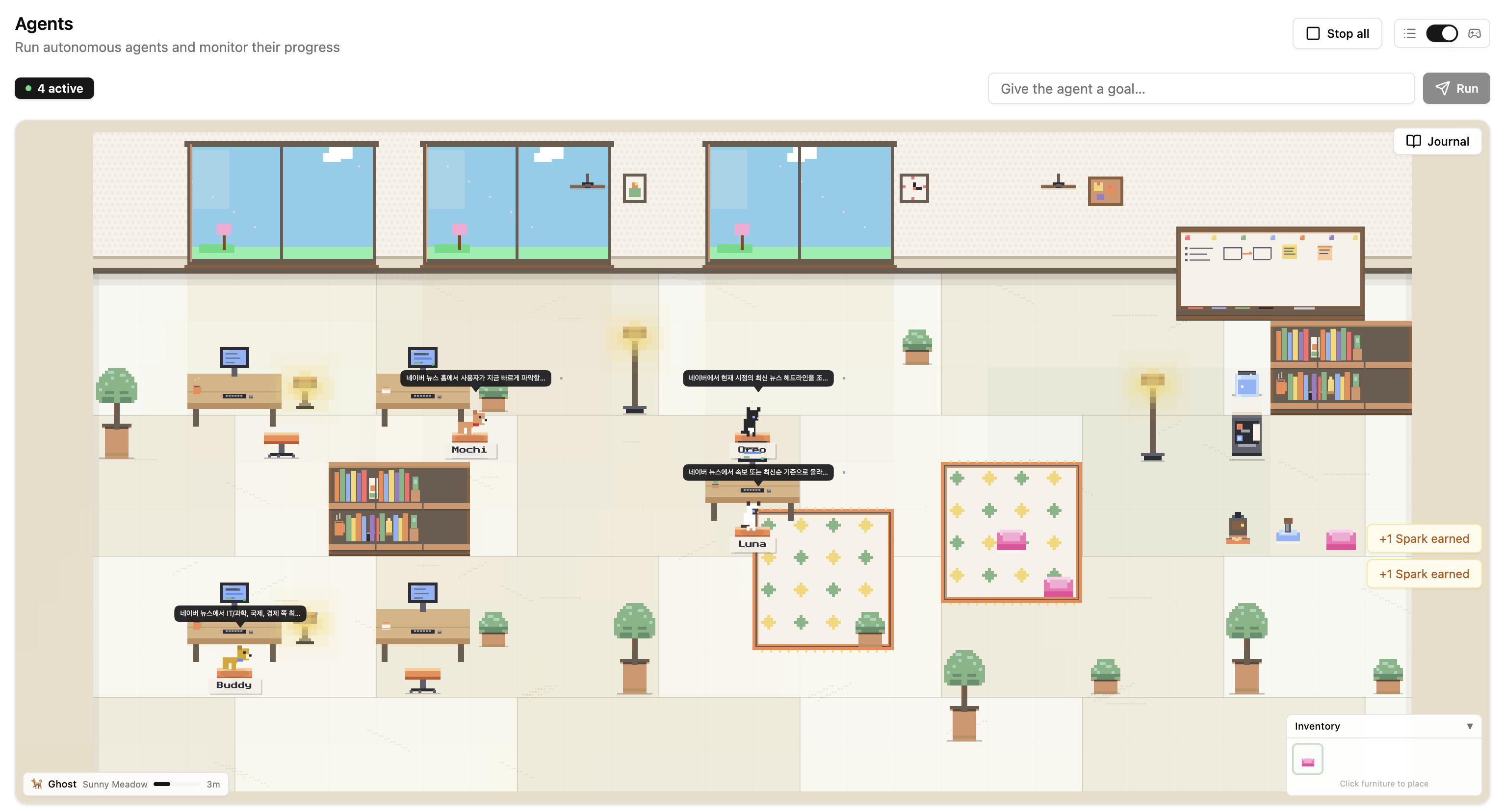
We rebuilt every tile. The old office was legible but chilly - pure flat color, no depth cues, and everything sitting at the same z-height. The new one leans into "a place you are glad is open on a second monitor": warm cream wainscoted walls, a staggered marble-tile floor with light veining, wood-framed windows with sills, and slowly-rotating ceiling fans overhead. Golden light beams drift in from the windows with dithered edges and dust motes sliding through them. Wall decorations (framed picture, wall clock, cork pinboard) fill the dead space above the furniture line.
The entire scene now draws from a single curated ~18-color palette. Desks use warm oak tops with one centered accessory (coffee mug, paper stack, or little desk plant - picked deterministically from the tile position so it does not flicker between renders). Chairs are backless 2-wide terracotta stools so it is obvious a pet is perched on the cushion, not hovering behind a chair back. Plants, lamps, shelves, whiteboards, and the water cooler all pull from the same wood + terracotta + sage family, which is what stops a dense scene from turning into visual noise.
2.5D sprites without collisions
The hardest part of the redesign was letting tall objects actually feel tall. A 1-tile-footprint plant that is 2 tiles tall used to either clip at the wall seam or overlap the neighboring tile's sprite. We fixed this with a small 2.5D layer: tall items (floor lamp 1x2, floor plant 1x2, bookshelf 3x1 drawn 2 tiles tall, whiteboard 4x1 drawn 2 tiles tall) now render upward beyond their grid footprint, with explicit draw-order rules so a shelf placed against the wall never peeks through the wall seam and a lamp next to a desk does not clip the desk's monitor.
Layout-wise the room now reads as four zones at a glance: four workstations on the left, a meeting room in the middle with a whiteboard, 3x3 rug, conference table and two stools, a lounge on the right with a rug, two cushions, tall lamp, and tall plant, and a far-right kitchenette with a water cooler, bookshelf, and pet feeder / bowl / cushion. Perimeter plants and lamps anchor each zone so the eye knows where one room ends and the next starts.
Pets rotate, and the working one is clickable
Previously the assignment loop picked the leftmost free pet and the leftmost free seat - so the same pet always worked and the rest looked permanently unemployed. Pets are now assigned randomly, so across a few hours you will see every pet take a turn at a workstation.
Clicking a working pet used to open a cramped popover with just a name and status dot. The new agent popover is a compact 320px card with the status dot, pet name, current task, a live tool indicator with animated dots, the last error if any, the most-used tools for the run, iteration / tool call / elapsed stats, and two actions (Stop and Open Full). The hover-to-inspect experience is much closer to a normal agent timeline - you get the information without context-switching to the Agents detail page.
Positions persist, even across reloads
The office used to reset to a default layout on every page reload: pets teleporting back to the feeder, seated pets standing up again, the walking pet forgetting it was headed to the water cooler. Now pet state (position, facing direction, and activity state) is batched and saved to localStorage every 3 seconds, plus one last write on tab blur or window close. Coming back to the Agents page puts every pet exactly where it was. Writes are coalesced so there is only one localStorage set per cycle - no thrash.
Deep-linkable agent notifications
This is the quietly biggest change in the release. When a background agent finishes, its completion notification now carries the session id in its payload. Clicking "Agent Done" - whether in the in-app bell popover, the macOS menu bar, or the Windows header bell - jumps you straight into that agent's detail page. No more "great, something finished, let me go hunt through the history list to find which run it was."
Under the hood this also required making Electron's native notification actually do something useful. Previously the in-app bell popover showed title and body but no action buttons, and the OS-level notification either did nothing or opened the app on a default route. Now notifications accept an actions array, macOS surfaces them as native buttons on the OS notification, and Windows / Linux fall back to opening the bell popover so the action chips remain reachable on every platform. The "Update ready to install" notification uses the same mechanism - it shows Install Now / Later, dedupes across multiple download cycles via a fixed notification id, and the Install button triggers a proper quitAndInstall instead of a silent toast.
Restart actually restarts now
The tunnel "restart desktop" button and the update-install restart path both used to call app.exit(0) (or autoUpdater.quitAndInstall) without first tearing down the spawned Node server subprocess. That skipped Electron's before-quit lifecycle, so the server kept running on port 13847 after the parent quit. The relaunched app then tried to bind the same port, failed, and sat in a worse state than before - the exact thing the user clicked restart to fix.
Both paths now go through a shared relaunchApp / installUpdateAndRestart helper that explicitly stops the server child, disconnects the tunnel client, then calls app.relaunch(); app.quit() (or quitAndInstall(true, true)). Double safety: if the helper somehow fails, the before-quit hook still fires because we use quit() instead of exit(0).
Claude Code on Windows, fixed for real
Windows users of the Claude Code (OAuth) provider were hitting a silent failure: every auth lookup spawned two powershell.exe subprocesses calling Get-StoredCredential and New-StoredCredential, which are part of a community PowerShell module (CredentialManager) that is not installed by default. Those spawns always failed, and the code fell through to a file-path fallback that was never actually the right path.
The root cause was the assumption that Claude Code on Windows writes to Windows Credential Manager. It does not. Claude Code on every platform writes to %USERPROFILE%\.claude\.credentials.json on Windows (and ~/.claude/.credentials.json on Linux). Foxl now reads and writes that file directly with no PowerShell spawn and no module dependency - the same file claude login produces. Token refresh round-trips through the same path.
Feed Generator: one timer, one source of truth
Changing the Frequency in Settings > Feed Generator from 5 minutes to 1 hour used to leave the old timer running. That is because the scheduler's auto-seeded Heartbeat schedule and the dedicated heartbeat-runner were both calling setInterval independently - changing one did not clear the other. The result: the Feed Generator would appear to respect the new interval while continuing to fire at the old one in the background.
Execution is now owned exclusively by the heartbeat-runner. The Heartbeat entry in the Schedules UI is display-only: the scheduler intentionally skips attaching a setInterval timer for the auto-seeded entry (via a new isAutoHeartbeatSchedule check). Settings and Schedules stay in sync in both directions - interval / enabled changes from Settings mirror to the schedule row, and edits in the Schedules UI mirror back to HEARTBEAT.md and the runner. We also stopped users from creating additional heartbeat-type schedules in the Schedules UI - there is exactly one Feed Generator heartbeat per workspace. For custom periodic schedules, use Cron.
Schedules UI gets a page-length Recent Runs
Recent Runs on the Schedules page is now server-paginated. The page fetches 50 runs at a time, and an IntersectionObserver sentinel near the bottom of the list triggers the next page as you scroll - so an inbox with thousands of executions does not blow up the initial render. The count line shows N of M loaded so you know when you have hit the end. Filter state and sort order continue to live client-side and operate on whatever is currently loaded.
The per-schedule Recent Runs section inside the detail dialog is gone - it was duplicating what the bottom card already shows, and the bottom card has filters. For the auto-Heartbeat row, the detail dialog now renders the actual HEARTBEAT.md content (read-only) instead of the misleading "No custom prompt set" placeholder.
Rare-encounter journal, earlier in v0.2.13
Already in this release: a Claude-Code-inspired rare-encounter journal with 18 critters across 5 tiers, gated by season, time of day, and agent completions. A welcome-back summary modal celebrates sparks / items / sightings earned while you were away. Pets fully replaced the older human agent sprites, each walking to a chair and "working" with an animated monitor. The background pet simulation now always runs when Pixel Office is enabled - we dropped the separate opt-in toggle because it was confusing ("is it on? why is my pet frozen?"). And a wall-clock catch-up simulation lets stats and rare rolls progress accurately after a long absence.
Server-side state backup lives at /api/pixel-office/state - a single-row blob store that overwrites in place, so history does not accumulate. The old visitor system was retired and unified under the rare-encounter journal (sightings-only). Inventory now surfaces only placeable items; the starter seed is a single comfy cushion so the first run is not overwhelming. Auto-forage was removed - pets stay home.
Fixes grab-bag
- Feed sidebar black dot that could not be dismissed (legacy Activities-era code).
- Goal-started agents now appear as separate rows in the history list - each run mints its own session id.
- Agent popover no longer shows 2 running agents for 1 goal. The in-memory default row and the fresh session row are now deduped.
- Sidebar label "Agent Team" simplified to "Agents" across all 10 locales.
- i18n interpolation now accepts both
{var} and {{var}} placeholder styles. - Monitor flicker on the working pet's desk now aligns to the desk's centered monitor and refreshes at a subtle 2 fps instead of strobing.
- Wall-anchored tall items (whiteboard, shelf) no longer get clipped or hidden when placed near the wall seam.
- Settings showed a stray "Background Pet Simulation" toggle even though the feature is always on - removed.
Upgrade
v0.2.13 rolls out via auto-update today on macOS and Windows. Existing pet positions and HEARTBEAT.md files are preserved as-is. If you are on Windows with Claude Code (OAuth) and auth was silently failing, upgrading should "just work" - no config change needed.